


Many students asked to me that how to resell products on meesho and earn money. Selling products on Meesho is one of the easiest ways to start online earning in India without investment. Meesho works on a reseller and supplier model, where you can sell products directly to customers using your smartphone. If you follow the correct steps and avoid common mistakes, Meesho can become a steady source of side or full-time income.
Step 1: Create Your Meesho Account
Step 2: Choose Products to Sell
Step 3: Set Your Profit Margin
Step 4: Share Products with Customers
Step 5: Receive Orders
Step 6: Track Orders & Support Customers
Step 7: Get Paid
How to Earn From Flipkart Affiliate Marketing (for beginners)
Create Your Meesho Account
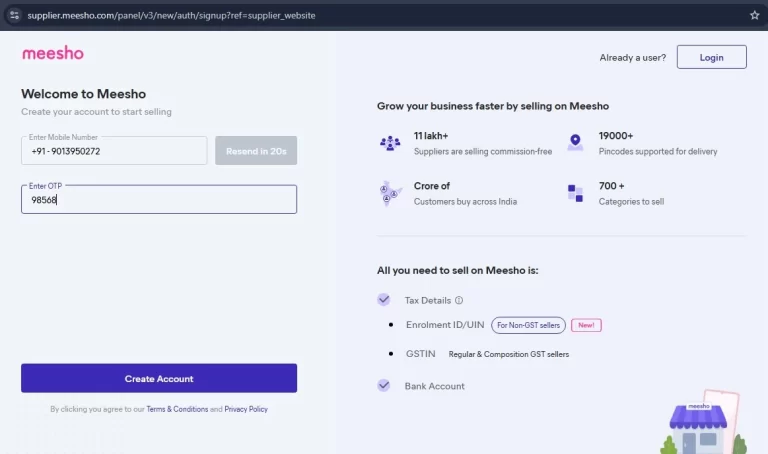
Creating a Meesho account is the first step to start selling products online without investment, especially for beginners who want to earn from home. Meesho provides a simple platform where anyone can sell products directly to customers without managing stock, packaging or delivery. With just a smartphone and an active bank account, you can start your online selling journey on Meesho and gradually build a steady source of income.
Download the Meesho App
First, go to the Google Play Store and download the official Meesho app. Make sure you install the correct app to avoid any fake or duplicate applications. Meesho works smoothly on most Android smartphones and is easy to use even for beginners.
Sign Up Using Your Mobile Number
Open the app and register using your active mobile number. You will receive an OTP for verification. Always use a mobile number that is linked to your bank account, as this helps in smooth payment processing later.
Choose Your Selling Role Carefully
Meesho allows you to choose between Reseller and Supplier. If you do not have your own products or inventory, select Reseller. This option is best for beginners because you can sell products already listed on Meesho without any investment.
Complete Your Profile Details
After signing up fill in your basic profile details such as your name and business preferences. A complete profile increases credibility and helps Meesho provide better support and recommendations.
Add Bank Account Details for Payments
To receive your earnings, you must add your bank account number, IFSC code and account holder name. Without bank details, Meesho cannot transfer your profit. Make sure all details are correct to avoid payment delays.
Verify Your Account
Follow verification steps provided by Meesho. This may include basic identity confirmation. Account verification is important for security and smooth transactions.
Choose Products to Sell

Choosing the right products is the most important factor for success on Meesho. Even if your account is perfect, wrong product selection can lead to no sales, returns and low profits. Smart product selection helps you get faster orders, happy customers and consistent earnings without stress.
Choose High-Demand Products
- Always sell products that people already want.
- Women’s clothing (kurtis, sarees, leggings)
- Home & kitchen items
- Daily-use products
- High-demand products sell faster than luxury items.
Check Product Ratings and Reviews
- Never select products without reviews.
- Minimum 4-star rating preferred
- Read customer comments
- Good reviews mean fewer returns and complaints.
Select Low-Return Products
- Avoid products with high return risk.
- Avoid fragile items
- Avoid size-confusing products initially
- Low returns protect your profit and account health.
Compare Prices with Other Sellers
- Check similar products on Meesho.
- Keep your price competitive
- Don’t set very high margins initially
- Affordable pricing brings more orders.
Focus on Trending Categories
- Trending products get better visibility.
- Festive wear during festivals
- Seasonal items
- Viral or popular products
- Trend-based selling increases chances of success.
- Check Delivery Availability
- Ensure the product is deliverable to your target areas.
- Pan-India delivery is better
- Faster delivery builds trust
- Poor delivery affects customer experience.
- Start with Limited Products
- Don’t sell everything at once.
- Start with 5 to 10 products
- Test what works
- Scale the best-performing products
- Testing reduces risk.
- Choose Products with Clear Images & Descriptions
- Good visuals help customers decide.
- Multiple images
- Clear product details
- This reduces confusion and returns.
Boat Headphones in Best Prices Check Now (Amazon Affiliate Link)
Set Your Profit Margin

Setting the right profit margin is very important if you want to earn consistently on Meesho. Many beginners either keep the margin too high or too low. A smart profit margin helps you get orders, build trust, and slowly increase your earnings as your customer base grows.
Understand the Product Base Price
Before setting any margin check product price on Meesho and delivery and handling charges (if any) your profit is added on top of this price.
Start with a Low to Moderate Margin
For new sellers keep ₹50 to ₹150 margin per product. Slightly higher margin for premium items
low margins help you get first orders faster.
Check Market & Competitor Pricing
Search similar products on Meesho don’t price too high initially. Competitive pricing attracts buyers and than once you gain trust, you can increase margins.
Focus on Volume, Not Just Margin
Selling more products with small margin is better than selling one product with high margin. High volume means stable income.
Increase Margin After Getting Reviews
Once you have regular orders, positive feedback than you can safely increase your margin.
Share Products with Customers

Sharing and marketing your products the right way is what actually brings orders on Meesho. Even the best products won’t sell if people don’t see them or trust you. Smart sharing, honest communication and consistent promotion help you reach more customers, build confidence and increase sales without spending money on ads.
Share Products on WhatsApp (Most Effective)
- WhatsApp is the fastest way to get your first orders.
- Share product links in personal chats
- Use WhatsApp Status daily
- Create a broadcast list (no spamming)
- Add short descriptions and benefits with links.
Use Facebook to Reach More People
- Facebook is great for organic promotion.
- Post products in relevant groups
- Share on your timeline
- Create a Facebook Page for your store
- Always follow group rules while posting.
- Promote Products on Instagram
- Instagram works well for visual products.
- Post images or short videos (Reels)
- Use simple captions and hashtags
- Share story links regularly
- Consistency increases visibility.
- Build Trust Before Selling
- People buy from those they trust.
- Share reviews and screenshots
- Answer customer questions politely
- Be honest about price and delivery time
- Trust converts viewers into buyers.
- Use Clear Product Descriptions
- Never just share a link.
- Mention price, size, color options
- Explain benefits
- Share delivery and return info
- Clear details reduce doubts and returns.
- Be Consistent with Marketing
- One-time sharing doesn’t work.
- Post daily or alternate days
- Mix products and helpful content
- Consistency brings regular orders.
Boat Headphones in Best Prices Check Now (Amazon Affiliate Link)
Receive orders and track orders on meesho
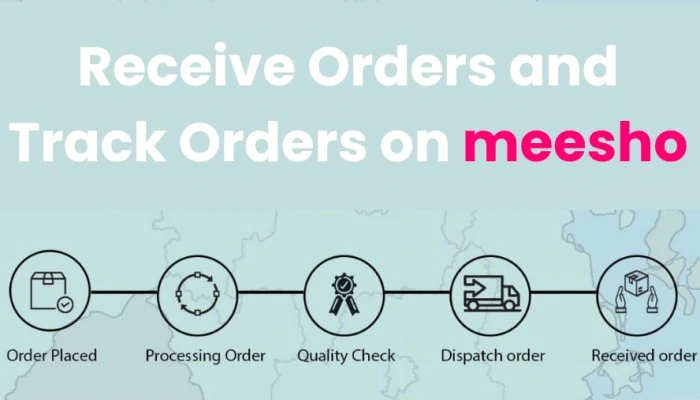
Receiving and tracking orders properly is very important for smooth selling on Meesho. Many beginners lose customers not because of bad products, but because they don’t respond on time or fail to track orders correctly. When you manage orders professionally, customers trust you more and are likely to buy again.
How You Receive Orders
When a customer places an order:
- They use your shared Meesho product link
- Order is confirmed automatically in the app
- You get an instant notification from Meesho
- You don’t need to manually accept orders.
Check Orders in the Meesho App
To view your orders:
- Open the Meesho app
- Go to My Orders / Orders Section
- You can see order status like confirmed, shipped, delivered
- Check this section daily.
Order Processing by Meesho
After order confirmation:
- Meesho informs the supplier
- Product is packed and shipped
- Courier delivery is handled by Meesho
- You don’t need to manage logistics.
Tracking Order Status
You can track every order easily:
- Order confirmed
- Shipped
- Out for delivery
- Delivered
- This helps you answer customer queries confidently.
Handle Cancellations and Returns
Sometimes orders may be cancelled before shipping
- Returned after delivery, meesho manages returns
- Learn reasons for returns
- Reducing returns improves earnings.
Payment After Delivery
Once the product is delivered:
- Meesho processes your payment
- Profit is transferred to your bank account
- You can check payment status in the app
If you have read this blog till here than it means you have to understood that how to resell products on meesho and earn money, some people confused about their paid system, my younger sister also asked me what is the paid process of meesho, how can I get my commission so friends here are the answer :
Paid System of Meesho

Getting paid on Meesho is simple and safe, because you never collect money directly from customers. Meesho handles the entire payment process for you. As a seller, you just focus on sharing products and getting orders meesho takes care of payment, delivery and settlement.
Customer Pays Meesho (Not You)
When a customer places an order:
- They pay online (UPI, card, net banking) or choose Cash on Delivery (COD)
- Payment goes directly to Meesho
- You never ask customers for money.
Order Is Delivered Successfully
Payment is processed only after:
- Product is delivered
- Delivery is confirmed
- This protects both you and the customer.
Meesho Calculates Your Profit
After delivery:
- Meesho deducts product cost (supplier price)
- Your added margin is calculated
- Returns or cancellations (if any) are adjusted
Payment Is Transferred to Your Bank Account
- Your profit is sent to your linked bank account
- Usually within 7 to 15 working days after delivery
- You can track payment status in the Meesho app
Check Payments in Meesho App
To see your earnings open Meesho app
- Go to Payments / My Earnings
- View completed, pending and upcoming payments
Important Things to Set Up for Payment
Make sure you have correct bank account details
- Active mobile number
- Verified Meesho seller account
- Wrong details can delay payments.
COD Orders Also Pay You
Even if the customer pays cash courier collects cash
- Meesho receives it
- You get paid normally
- COD is completely safe for you.