
If you are searching for how to apply for Google AdSense in 2026 so this blog is for you. Google AdSense is one of the best ways to earn money in dollars from your website because it is beginner-friendly, reliable and completely automated. Once your blog starts getting traffic from Google Search, AdSense shows relevant ads to your visitors and pays you for clicks and impressions without any manual effort. It doesn’t require selling products or handling customers, making it perfect for passive income. The platform is trusted worldwide and offers stable payments and supports multiple languages and niches. Even small websites can start earning and as your traffic grows, your income in USD ($) can increase significantly over time. The steps I am going to tell you, I have also used these steps to monetize my blogging website. This is the easiest method that I am going to tell you.
Your first step is make your website ready before applying for monetization because it directly decides whether you get approved or rejected. Think of your website as your online shop if it looks unprofessional, slow or empty, visitors and even platforms like Google AdSense won’t trust it. A good website should have high-quality content, clean design and a smooth user experience so that visitors can easily read and navigate. In 2026, search engines like Google Search also prioritize user-friendly websites which means your blog should load fast, mobile responsive and provide real value. Many beginners make the mistake of applying too early with just a few posts but the reality is that a strong foundation increases both approval chances and long-term earnings. So instead of rushing focus on building a website that looks professional, helpful and trust worthy.
Publish High-Quality Content
- Write at least 25 to 30 original blog posts
- Each article should be informative and helpful
Use a Clean & Professional Design
- Choose a simple, user-friendly theme
- Avoid too many colors or distractions
- Make navigation easy for visitors
Improve Website Speed
- Use fast hosting and optimized images
- Slow websites get rejected and lose visitors
- Speed also helps ranking on Google Search
Make It Mobile-Friendly
- Most users visit from mobile so please make it mobile friendly
- Your site should look perfect on all devices
- Mobile optimization is important for approval
Affiliate marketing or Google adsense which is best for your website
Avoid copy-paste and low-quality content
Platforms like Google AdSense strictly reject websites that use duplicate, spun or thin content because it provides no real value to users. In 2026, search engines like Google Search are very smart they can easily detect copied or poorly written content, even if it’s slightly modified. If your content is original, helpful and written for real people, your chances of ranking higher and getting approval increase massively. Think of your blog as a solution platform if your content genuinely helps someone, both users and adsense will trust you.
Always Write Original Content: Never copy from other websites, Write in your own words and style, Share your own knowledge or research
Focus on Value, Not Just Words: Don’t write just to increase word count, Provide real solutions, tips or explanations , Helpful content give you better ranking on google search
Maintain Proper Article Length: Write at least 1000 to 1500 words per post, Cover topic in detail, not only half information, Avoid very short or thin articles
Do Research Before Writing: Understand the topic clearly, Check what others are missing and improve it, Make your content better than competitors
Avoid AI Spam Content: Don’t publish bulk AI generated content without editing, Always humanize and improve it, Add examples, experience or personal touch
Add all Important Pages
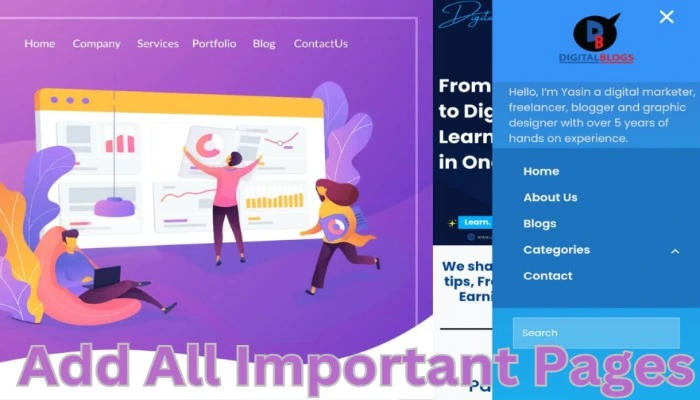
Adding important pages is a small step that makes a huge difference in getting approval and building trust. These pages tell both visitors and platforms like Google AdSense that your website is real, transparent and professional. Without them, even a good blog can get rejected because it looks incomplete or untrustworthy. In 2026, search engines like Google Search also consider these pages as trust signals which helps in better ranking and credibility. Think of these pages as your website’s identity they explain who you are and what your site is about and how users can interact with you safely.
- About Us Page
- Explain who you are and what your blog is about
- Share your purpose, experience or mission
- Helps build trust with visitors
- Contact Us Page
- Provide email or contact form
- Allows users and companies to reach you
- Required for approval on Google AdSense
- Privacy Policy Page
- Explain how you collect and use user data
- Mention cookies, ads and third-party services
- Very important for AdSense approval
- Disclaimer Page
- Clarify that your content is for information purposes
- Protects you from legal issues
- Important for niches like finance, health or earning
Get some Traffic on your Website or Blogs

Getting some traffic before applying for monetization is what separates approved blogs from rejected ones. Platforms like Google AdSense want to see that real people are actually visiting your website and finding value in your content. Even though there is no official minimum traffic requirement, if your website have consistent visitors especially from Google Search, shows that your blog is active, useful and trustworthy. In 2026, it’s not just about writing articles it’s about getting those articles in front of the right audience. Many beginners fail here because they publish content but don’t promote it or optimize it properly. If you focus on the right traffic strategies, even a small amount of genuine traffic can significantly increase your chances of approval and future earnings.
Focus on SEO (Search Engine Optimization)
- Use proper keywords in your articles
- Write titles people actually search for
- Helps your content rank on Google Search
Write on Low-Competition Topics
- Target beginner-friendly keywords
- Avoid highly competitive topics in the beginning
- Easier to rank and get traffic faster
Publish Content Consistently
- Post 3 to 4 articles or blogs per week
- Regular updates signal activity to Google Search
- More content means more chances to rank
Use Internal Linking
- Link your blog posts with each other
- Helps users stay longer on your site
- Improves SEO performance
Share on Social Media
- Share posts on WhatsApp, Facebook, Telegram
- Brings initial traffic to your blog
- Helps in faster indexing
Write Helpful & Problem-Solving Content
- Focus on user problems and solutions
- High-quality content ranks better
- Builds trust with visitors
Now You can Apply for Google Adsense
Applying on Google adSense is the step where your hard work finally turns into earning opportunities. Once your website is ready with good content, proper pages and some traffic from Google Search you can submit your site to Google adSense for approval. This process checks whether your blog follows all policies and is useful for users. If everything is set correctly, approval is usually smooth but even small mistakes can lead to rejection, so it’s important to follow each step carefully.
Create Your New Account on Google AdSense (Click Now)
- Visit Google AdSense Website
- Go to Google AdSense
- Click on “Get Started”
- Sign in with Your Gmail
- Use your existing Google account
- Make sure your email is active and correct
- Enter Your Website URL
- Add your website link, don’t forget to link your site on search console
- Make sure your site is live and fully ready
- Fill Basic Details
- Select your country
- Choose whether you want AdSense tips or not
- Accept terms & conditions
- Create AdSense Account
- Your account will be created instantly
- Now you’ll enter the dashboard
Connect Your Website to google adsense
Connecting your website to AdSense is the step where you prove that you actually own the site you’re trying to monetize. Without this verification, Google AdSense will not review or approve your application. This process is simple but very important many beginners get stuck here because they don’t place the code correctly. Once you connect your site properly, AdSense can access your pages, check your content quality and decide whether your blog meets their policies. Think of it as giving permission to adsense to inspect your website.These are the steps to connect your website to adsense :
- Get the AdSense Verification Code
- After signing up and account creation on Google AdSense
- You will see a code (HTML script) in your dashboard
- Copy that code carefully
- Paste Code in Website <head> Section
- Go to your website dashboard (WordPress/Blogger)
- Open Theme Editor or Header section
- Paste the adsense code inside the <head> tag
- Save Changes
- After pasting the code, click Save
- Make sure the code is properly added
- Go Back to AdSense Dashboard
- Return to Google AdSense
- Click on “I have placed the code”
- Submit your website for review
- Wait for Verification
- AdSense will check if code is correctly installed
- If detected, your site moves to review stage
Read More to Know : How to Apply for Google AdSense for your Website
Wait for Review and Approval
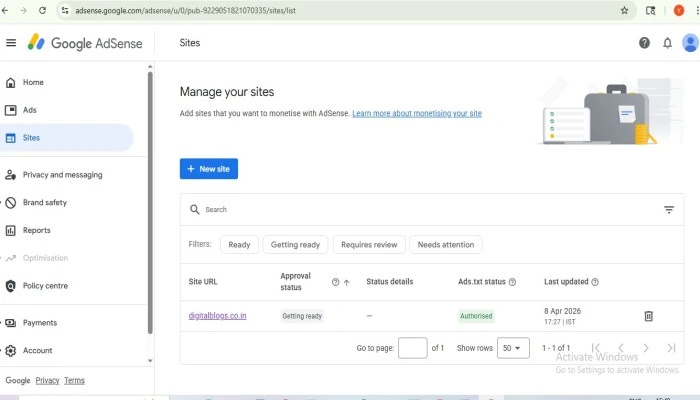
Once you’ve applied and connected your site the final stage is all about patience and making sure everything stays perfect while your blog is under review. During this time, Google AdSense checks your entire website content quality, user experience, policies and traffic sources. Many people think the work is done after applying but this phase is just as important. If your site meets all guidelines, you’ll get approved and can start showing ads. If not so you’ll need to fix issues and try again. The good news is, once you get approved, your blog officially becomes an earning asset and you can start generating income in dollars.
What Happens During Review
- Google Adsense scans your website content and structure
- Checks if your blog follows all policies
- Verifies content originality and usefulness
How Long It Takes
- Usually it takes 4 to 14 days
- Sometimes can take longer depending on review load
What You Should Do During This Time
- Don’t remove the AdSense code
- Keep publishing quality content
- Avoid making major design changes
Approval Notification
- You’ll receive an email from Google AdSense
- Your dashboard will show “Approved” status
What It Means
- Your website is now eligible to show ads
- You can start monetizing your traffic
- Your blog is officially trusted by AdSense
- Enable Ads on Your Website
- Turn on Auto Ads (easy for beginners)
- Or manually place ads in posts/sidebar
- How You Earn
- Earn per click (CPC) and per impression (CPM)
- Higher traffic from Google Search give you more income
What to do if you get rejected
Getting rejected by AdSense can feel frustrating but honestly it’s very common and fixable. A rejection from Google AdSense doesn’t mean your blog is bad it just means something is missing or not meeting their guidelines yet. The smart approach is to treat rejection like feedback, fix the issues and apply again stronger. Many successful bloggers get approved on their 2nd or 3rd attempt. If your content is good and you improve the weak areas, approval is just a matter of time.
Understand the Rejection Reason
- Check the email from Google AdSense
- Common reasons are Low-value content, Thin content, Policy violations
Improve Content Quality
- Add more detailed and helpful articles (1000 to 1500+ words)
- Remove duplicate or weak blog posts
- Focus on solving user problems
- Make sure you have compulsory pages like About Us, Contact Us, Privacy Policy, Disclaimer
Increase Traffic
- Write fully SEO based articles
- Target low competition keywords (use google keyword planner)
- Get some real visitors from Google Search
Remove Policy Violations
- Avoid copyrighted or copied content
- Don’t post illegal or harmful content
- Follow adsense guidelines strictly
Wait Before Reapplying
- Don’t apply immediately again
- Wait at least 7 to 15 days after fixing issues
- Show improvements before reapplying
- Go back to Google AdSense
- Submit your website again
- Many bloggers get approved in 2nd attempt